Thursday, September 27, 2007

3.71 M33 Install Guide

Here is a step by step guide for installing 3.71 M33. Please note that you must be running 3.52 M33-3, 3.52 M33-4 or 3.60 M33 to begin this installation.

Note: Before installing 3.71 M33, be warned that it currently is lacking the 1.50 kernel, even on regular (Phat) PSPs. Dark_AleX does plan to release a 1.50 kernel patch within the next few days, but for now you can use the eLoader to run 1.50 kernel homebrew on 3.71 M33.

Installation Guide

First grab the 3.71 M33 files and extract them.

1. Copy the UPDATE folder contained in the archive to X:/PSP/GAME
2. Download the 3.71 EBOOT, and then place it in X:/PSP/GAME/UPDATE
3. Navigate to the Game menu on the PSP and execute the program, it will not run unless there is 78 percent battery free.
4. Press X and the update process will start. Yes it may look similar to a regular Sony update but don't worry!
5. Once finished, the updater will ask you to press X or O to reboot. You MUST do this, otherwise you'll end up with a brick.
6. You've now successfully installed 3.71 M33 ;)


PSP Custom Firmware 3.71 M33 Released

Team M33 has just released PSP custom Firmware 3.71 for both PSP "Phat" and PSP Slim.
You can get it here: http://forums.exophase.com/showthread.php?t=3661

Powered by ScribeFire.

Thursday, September 20, 2007

Disable USB Flash Drives


Update 1/18/2007 11:01 PM EST: I have
received a few questions about this method - no it will not disable mice, or keyboards. It only disables storage devices attached to the USB port. This includes hard drives, flash drives, and any other type of USB storage device. And yes, if the user has administrator access they can reverse the changes.


USB flash drive
Our USB Flash drive enable/disable program has been out for quite a while
now. Recently we have been getting bug reports that it no longer works.

How it operates is simple, we set a registry key that tells the UsbStor driver not to load on boot:

HKEY_LOCAL_MACHINE\SYSTEM\CurrentControlSet\Services\UsbStor

Start = 4 (Disabled) - Don't start the driver on boot
Start = 3 (Enabled) - Start the driver on boot

If we visit Microsoft, this is an appropriate way to disable USB drives, they even recommend it as a group policy to disable USB, CDROM, and floppy drives:

http://support.microsoft.com/kb/555324

After loading about 10 different variations of Windows (2000, XP, 2003, and Vista with different service packs) in VMWare we started to see a clearer picture.

Some variations will simply reset the key 'Start' back to 3 when a new flash drive is plugged in. The first trick we tried was denying write access for the system account on the USBStor registry key.

It worked on everything except Windows 2003. This version of windows would reset permissions on the key - and delete it!. Then it would re-create with the USB storage enabled.

Then we came across this document:

http://support.microsoft.com/kb/823732

(Looks like it was published much later than KB 555324)

It tells us to put deny permissions for the users we want to lock out on UsbStor.inf, and UsbStor.pnf in the c:\windows\inf folder. Funny thing - it doesn't work. Windows XP will reset the permissions and let the user install their flash drive anyhow.

Now we could have created a filter driver that would sit between windows and usb storage, but we wanted something simple that an administrator could do without even using our program.

We found a simpler solution...rename the files. If we simply rename the files to UsbStor.inf.backup, and UsbStor.pnf.backup windows can no longer load the drivers for usb storage.

So to recap. Rename the files, set the registry key to 4, and users can no longer access any type of usb storage. Reverse the rename, and reset the registry key to 3 and users can access their usb storage again. Ahh. Almost forgot. Reboot required each time you switch.

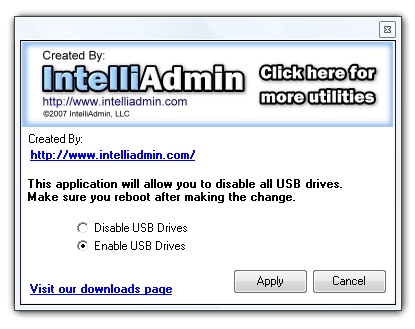
We have a few programs now that will do this for you. First the USB Disabler. It is for disabling, or enabling USB flash drives on the computer you run it from.

Disable USB Flash Drives

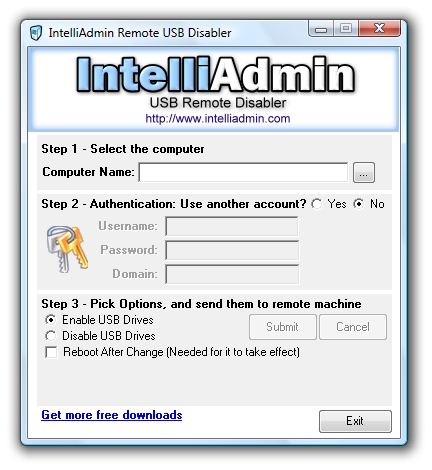
Second we have the remote USB flash disabler. It will allow you to pick a machine on your network and enable, or disable USB flash drives

Disable USB Flash Drives

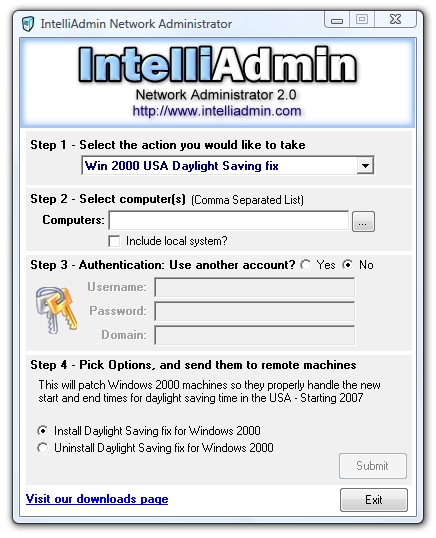
Third, our Network Administrator product can apply it to all the machines on your network.

Disable USB Flash Drives

They all can be found on our downloads page

Article grab from http://www.intelliadmin.com/blog/2007/01/disable-usb-flash-drives.html


Powered by ScribeFire.

How to disable the use of USB storage devices

Important This article contains information about how to modify the registry. Make sure to back up the registry before you modify it. Make sure that you know how to restore the registry if a problem occurs. For more information about how to back
up, restore, and modify the registry, click the following article number to view the article in the Microsoft Knowledge Base:

256986 (http://support.microsoft.com/kb/256986/) Description of the Microsoft Windows registry

How to disable USB sticks and limit access to USB storage devices on Windows systems

USB storage - a possible security risk?

Decent IT administrators secure their networks behind firewalls. They install mail filters on their SMTP servers and deploy anti-virus software on all client workstations. But securing the network is not sufficient -- what happens if the users bring their own USB memory sticks and connect them to the computers at their office? A 1 Gb USB stick can sometimes hold an entire company's vital data. Within minutes or even seconds an employee has all the files they need in order to start up their own business and take all the customers with them.

Alternatively, what happens if a careless user accidentally compromises the network with an infected USB stick?

What does Microsoft have to say about it?

If you, the administrator, want to establish a minimum level of security, it is absolutely necessary to control which users can connect USB memory sticks to a computer. Unfortunately, a default Windows XP or Windows 2000 installation comes with no limitations on who is able to install and use USB storage media. Microsoft knowledge base article 823732 contains instructions on how to disable USB storage access for a certain group of users; however, the article only distinguishes between whether or not a USB storage device has been installed on a particular computer. Furthermore, the instructions are limited to a stand-alone computer. According to the general rule of thumb "If it's tedious, there is a better way", I try to avoid techniques that force me to repeat certain tasks for each computer that I manage. That's what group policy objects (GPO) are for.

Suggestions?

Mark Heitbrink describes how to disable USB storage devices entirely on all or some computers in the network. He employs an ADM template in a group policy object that disables the USB storage driver (USBSTOR). The ADM template simply sets the registry value HKEY_LOCAL_MACHINE\SYSTEM\CurrentControlSet\Services\UsbStor\Start to 4 (Disable). But his technique has a serious drawback. It only works if the USB storage driver is already installed. If it has not yet been installed, Windows' plug & play subsystem automatically resets the Start value to 3 (Manual) when it installs USBSTOR after a USB storage device is plugged in for the first time. In that case, USBSTOR remains enabled until the GPO is re-applied, usually at the next reboot. If the storage device is plugged in during that reboot, it will still be available because the USBSTOR driver is started before any GPOs are processed.

The Howto!

If we combine Mark Heitbrink's approach with the one outlined in knowledge base article 823732, we get a more reliable solution. Firstly, we need to prevent USBSTOR from being installed unless the currently logged on user is allowed to use USB storage. We do that by restricting access to USBSTOR.INF and USBSTORE.PNF in a GPO such that PNP can't automatically install the driver. This is possible because when PNP installs a driver, the installation is performed using the priviledges of the currently logged on user. Secondly, we need to make sure that USBSTOR is not started when a USB storage device is plugged in. For that we use Mark's ADM template. The only minor drawback of my solution is that users with access to USB
storage need to manually start USBSTOR before connecting USB storage devices.

  1. In Active Directory Users and Computers, open an existing GPO or create a new one and open it. Use the security settings of that GPO to specify which computers it affects.
  2. In that GPO, go to Computer Configuration – Windows Settings – Security Settings – File System and create a new entry (right-click File System and select Add File). Specify the location of USBSTOR.INF (usually SystemRoot%\Inf\USBSTOR.INF) Change the security settings of the new entry. The security settings that you specify here will be enforced on the USBSTOR.INF of every computer to which the GPO is applied. This process is not additive, which means that the previous security settings of USBSTOR.INF will be overwritten by the ones given in the GPO. It is therefore recommended to grant full control to SYSTEM and local administrators. But unlike in the default security settings of USBSTOR.INF, you should not grant any priviledges to Everybody. You do not need to explicitly deny access – just omit an entry for Everybody. Optionally, you can grant read access to a certain group. Members of this group will be able to use USB storage.
  3. Repeat the above two steps for USBSTOR.PNF.
  4. Download USBSTOR.ADM.
  5. Back in the GPO, right-click Administrative Templates under Computer Configuration and select Add/Remove Templates. Click Add and browse to the location of USBSTOR.ADM. Close the dialog.
  6. You should now have an additional entry called Services and Drivers in Administrative Templates. Click on it. If it is empty, select View from the menu and uncheck Show Policies Only. Click back on Services and Drivers in Administrative Templates. It should now show the USB Storage policy. Double click it, select Enabled and pick Disabled from the Startup Type drop down. Again, the policy must be enabled wheras Startup Type must be Disabled.
  7. Close the dialog as well as the GPO and boot/reboot one of your workstations. Make sure no USB strorage device is connected to that computer. Log on with administrative privileges and check the permissions of USBSTOR.INF and USBSTOR.PNF. Check the value of the HKEY_LOCAL_MACHINE\SYSTEM\CurrentControlSet\Services\UsbStor\Start. It should be 4. It is also ok if the UsbStor key doesn't exist at all.
  8. On the same workstation, log off and back on as a user that should not have access to USB storage. Connect a USB memory stick or a similar device. Nothing should happen. Remove the memory stick.
  9. Log on as a user that should have access to USB storage and execute net start usbstor in a command shell or at Start – Run before connecting the memory stick. The memory stick should initialized and mapped to a drive letter. If USBSTOR fails to start, it's probably because this is the first time a memory stick is plugged into the workstation in which case
    USBSTOR is not yet installed. Nevertheless, the memory stick should be initialized and mapped correctly but you need to reboot in order to reapply the administrative template such that USBSTOR is disabled again. Alternatively, you can disable it manually by downloading and double clicking USBSTOR.REG as well as executing net stop usbstor.
  10. Instruct the users with access to USB storage that they need to execute net start usbstor before they can connect a USB storage device.


AttachmentSize
usbstore.adm530 bytes
usbstore.reg258 bytes


Powered by ScribeFire.

Wednesday, September 19, 2007

How AJAX can Work for you

If you’ve been in the internet world for sometime, you might have bumped in the word AJAX. No, it’s not the European Soccer team but it’s a new web development tool that has been the craze for millions of web developers. Every training center and computer schools are scrambling to learn this new software so that it can be offered in courses.

Proficiency in this web technique means potential thousands of revenues. If you’re just starting to learn some web programming techniques, better culminate them with AJAX.

AJAX is short for Asynchronous JavaScript and XML. That sound’s really complicated and it really is. So that we will understand them let’s take a look at the first word: “asynchronous”. Asynchronous in the computer world is something really revolutionary. Before AJAX, the page or the action will just load because of the communication of your computer to the server. For example, when you click on menu, it will communicate with the server so that it will load the menu to your computer. That could cause some delay since there are so many things to consider.

First, the server should be online; second, you should have a fast internet connection and third the possibility of serving more than one requests at the same time. Imagine you have a good computer and very fast internet connection but you can’t really access the website because it can’t handle the number of requests at the same time.

For the page to load, it will basically need the assistance of the server to make them work. But with “Asynchronous” it doesn’t need any action from the server once it has started. If you have a very fast PC, you don’t need to worry about the internet connection. A simple broadband connection will be just enough to load the pages faster. If we’re just a regular internet surfer who just wanted to watch videos, this sounds very good.

There will be online tools that will load faster so that we can watch the videos faster and better. Among the websites that are using AJAX right now is Google. You may notice that the homepage of Google is really fast to load no matter what your internet connection is. Yahoo is also following this trend. Everyone now wants to have this technique in their websites to lift the burden from the servers and place it to the customers.

Google is on top of this right now as it uses AJAX for their search engines, Google Maps, Google Earth, Gmail and other Google based applications.

As consumers, it could pose some threat especially to those who have poor computers and poor internet connection. But I think it’s not a reality right now. Most computers who can run Windows XP in their computer smoothly will have the ability to have the benefits of Google.

This revolutionary technique is taking the world by storm. Even though you don’t know what exactly is happening in the internet, it surely is making things work smoothly for all of us.


Technorati Tags: , , ,

Powered by ScribeFire.

Ajax Tools that a Webmaster can Use

AJAX is changing the shape of the web even as we speak. There are thousands of applications being developed right now and they are ready to launch. From Google to the garage web developers, Ajax is now the technique everyone is learning. Though it may require some time so that this be implemented in almost all websites, it’s slowly chipping in to all major internet search engines. Yahoo is also adopting the technique so it won’t be long that everyone is using this.

If you’re a webmaster, you also want your website to be functional to Ajax. Each website requires a specific bandwidth so that it can properly load in the computer of the user. But if you successfully load Ajax, although it will still require bandwidth
it will not be as much as the previous version.

Since creating a website based on Ajax is quite tricky, there are some websites and tools that you can use in your web creating software so that you can add something cool. Note that these sites are free and if you already know how to write a code for software, you can develop it into something better than the web developers created.

Star Ratings Bar – Masugadesign.com has developed a script for webmasters that needs an interactive star rating for their articles, pictures and movies. The problem that we used to have then was that people wanted to rate something, the need to be logged in and the page will refresh. The user will have to wait again. This code, when properly loaded in the webpage automatically updates the star rating without refreshing the page. No need for the users to log in, refresh and wait for the page to load again. Normally that prevents the people from rating something but if you have this, they can just click won’t
worry about the page. You can directly reach the page by here.

Prototype Window – Now this is for bragging rights. Personally, I really don’t need a new window to take a look at any page. But this Ajax tool is so cool you really should consider having them to your website. This window will prevent you from seeing the whole page, but this is a great help menu for the people who wanted to learn more about the website or some information about what they are purchasing. The good thing about this is that instead of a new page that will be loaded it will just load on the present page. Get the code here.

Ajax Load Generator – if you have a video sharing website, this is perfect for you. Imeem, Veoh and other video sharing websites all have this nifty indicator when a video is slowly loading to your computer. All you need to do is to indicate what background color you want for your video template, the loading icon, size and just generate the code. Just point the video or picture to your website and you’re on your way. Get the codes here.


Technorati Tags: , , ,

Powered by ScribeFire.

Ajax Tutorials Websites

There are so many things that you have to learn before you can
actually jump into Ajax. If you’re only proficient in one language, you
need to research and relearn the things you forgot in college or in
your computer school. It’s a technique where one language is combined
to another. Plus, it’s java intensive and there are only a handful of
people who has learned the Java software. Before Ajax, Java was
perceived to be useful but requires a faster internet connection and a
faster computer. Confused on where to start; we’ve browsed through the
internet and found some sites that has helped us to start a program on
Ajax.


http://dojo.jot.com/Tutorials/HelloWorld - “Hello World” was the
first thing that you have to learn in computer schools. Now you have to
start from the very beginning and do the “Hello World” routine again.
If you think you’re too advanced for this step, you can still move
forward. There are tons of chapters that you can go through. There are
codes that will be provided from the very start. You’ll be surprised on
how different the code “Hello World” in simple program compared to the
“Hello World” from Ajax. There are also toolkits that you can download
to help you get started with the application.


http://www.ajaxprojects.com/ajax/index.php - This site will continue
what you learn in a certain platform. Ajax applications in different
frameworks are presented. There will be detailed explanation and
tutorials in different frameworks such as .Net, Java, PHP, Ruby and
other frameworks that you can think of. Instead of giving you the step
by step program, you’ll have the code and make some changes from there.
This is a good site if you already know the rudiments of Ajax. There’s
also a portion where they will teach you the “Hello World” if you don’t
have any idea where to start.


http://www.ajaxtutorial.net/ - As someone who wants to learn Ajax
from its roots, you might expect something of a “Hello World” guide
based on the name of the site. But instead of instructing Ajax to a 4th
grade kid, the website is full of codes. This site is definitely for
programmers who wanted to implement Ajax in their websites. These codes
are freely given; you just have to change the variables to get what you
want. Browse through months and months of updates until you can get the
program that you want. There’s also a demonstration of the code and see
its effects on a certain website.


http://www.w3schools.com/ajax/default.asp - We reserved the best for
last. As usual w3schools.com has developed a great self learning site
about Ajax. Everything is covered: from the definition, the things you
have to learn and the things you have to apply. This free learning site
might be too basic for some, but this is definitely the site you want
to start if you’re not familiar with anything about Ajax. It might be
confusing at first but when you read through and take notes, everything
will just unfold before you. You can start creating simple codes before
you know it.


Technorati Tags: , ,

Powered by ScribeFire.

IT Code of Ethics


Version 1.0 - April 24, 2004.


This document may be reproduced and distributed -- providing proper credit to SANS is given.


I will strive to know myself and be honest about my capability.


  • I will strive for technical excellence in the IT profession by
    maintaining and enhancing my own knowledge and skills. I acknowledge
    that there are many free resources available on the Internet and
    affordable books and that the lack of my employer's training budget is
    not an excuse nor limits my ability to stay current in IT.

  • When possible I will demonstrate my performance capability
    with my skills via projects, leadership, and/or accredited educational
    programs and will encourage others to do so as well.

  • I will not hesitate to seek assistance or guidance when faced
    with a task beyond my abilities or experience. I will embrace other
    professionals' advice and learn from their experiences and mistakes. I
    will treat this as an opportunity to learn new techniques and
    approaches. When the situation arises that my assistance is called
    upon, I will respond willingly to share my knowledge with others.

  • I will strive to convey any knowledge (specialist or
    otherwise) that I have gained to others so everyone gains the benefit
    of each other's knowledge.

  • I will teach the willing and empower others with Industry Best Practices (IBP).

  • I will offer my knowledge to show others how to become
    security professionals in their own right. I will strive to be
    perceived as and be an honest and trustworthy employee.
  • I will not advance private interests at the expense of end users, colleagues, or my employer.

  • I will not abuse my power. I will use my technical knowledge,
    user rights, and permissions only to fulfill my responsibilities to my
    employer.

  • I will avoid and be alert to any circumstances or actions that
    might lead to conflicts of interest or the perception of conflicts of
    interest. If such circumstance occurs, I will notify my employer or
    business partners.

  • I will not steal property, time or resources.

  • I will reject bribery or kickbacks and will report such illegal activity.

  • I will report on the illegal activities of myself and others
    without respect to the punishments involved. I will not tolerate those
    who lie, steal, or cheat as a means of success in IT.

I will conduct my business in a manner that assures the IT profession is considered one of integrity and professionalism.


  • I will not injure others, their property, reputation, or employment by false or malicious action.

  • I will not use availability and access to information for personal gains through corporate espionage.

  • I distinguish between advocacy and engineering. I will not present analysis and opinion as fact.

  • I will adhere to Industry Best Practices (IBP) for system design, rollout, hardening and testing.

  • I am obligated to report all system vulnerabilities that might result in significant damage.

  • I respect intellectual property and will be careful to give
    credit for other's work. I will never steal or misuse copyrighted,
    patented material, trade secrets or any other intangible asset.

  • I will accurately document my setup procedures and any
    modifications I have done to equipment. This will ensure that others
    will be informed of procedures and changes I've made.

I respect privacy and confidentiality.


  • I respect the privacy of my co-workers' information. I will not
    peruse or examine their information including data, files, records, or
    network traffic except as defined by the appointed roles, the
    organization's acceptable use policy, as approved by Human Resources,
    and without the permission of the end user.

  • I will obtain permission before probing systems on a network for vulnerabilities.

  • I respect the right to confidentiality with my employers,
    clients, and users except as dictated by applicable law. I respect
    human dignity.

  • I treasure and will defend equality, justice and respect for others.

  • I will not participate in any form of discrimination, whether
    due to race, color, national origin, ancestry, sex, sexual orientation,
    gender/sexual identity or expression, marital status, creed, religion,
    age, disability, veteran's status, or political ideology.


Powered by ScribeFire.

Axis, Axis2 and CXF: Surveying the WS Landscape by Bjorn Townsend

It's an exciting time to be in open source web services development. Two new next-generation web services frameworks
have been released in the last year and a half, both under the umbrella of the Apache Software Foundation.
These frameworks are Apache Axis2, which hit 1.0 at the end of April, 2006 and is currently in the release
candidate stage for version 1.3, and Apache CXF, which released version 2.0 (the first version released under
that name) in early July 2007.


Both frameworks also evolved from existing projects. Axis2 came from the well-known Axis 1.x series. CXF is
literally the offspring of the XFire and Celtix projects, as those two projects have pooled their codebases and
development teams to give rise to CXF. The delta between the old projects and their new versions is significant
in each case. Axis2 is a total rewrite of Axis from the ground up, using a new modular architecture that allows its
functionality to be more easily extended. CXF has also been extensively retooled from its XFire and Celtix origins.


This leads to a few questions. Should existing applications using Axis 1.x, XFire or Celtix move to the new versions
of those projects? If a developer does decide to migrate his or her application to one of the new frameworks,
which one should they use? Conversely, if one is writing a new web service from the ground up and no migration
is required, which one should they use? Is one framework inherently better than the other?


Let's tackle these questions in order. Firstly, should existing applications migrate? The answer to that question
depends largely on the point in its lifecycle your application has reached. A project which is very static and mature,
with few or no changes expected in the foreseeable future, probably doesn't need to migrate as the current framework
is serving its needs well enough. If the application's performance or functionality is impacted by bugs, it might
be worth migrating, particularly for users of Axis 1.x, as most of the developer community around Axis has
refocused its resources around Axis2. An Axis 1.5 release is in the works, but it may not happen for many months
down the road.


As for which project to migrate to, it might be easiest to move to to the next generation of your current framework.
Both Axis2 and CXF provide migration guides that give developers tips on how to migrate from their previous versions,
but as of this writing neither project has provided migration tools or guides for porting web services from one
framework to another. In such a migration, though, it's always worth looking at all the options available. Axis2 and
CXF each take different approaches to web service development, and these approaches will appeal more to some
developers than others.


This brings us to a good point to compare Axis2 and CXF on their own merits. They are of course in many ways
comparable; of necessity web services frameworks must fill in all the same blanks, but since both projects are very
young, each has certain areas that are more well-developed than others. The chief differences are as follows:


  • CXF has support for WS-Addressing, WS-Policy, WS-RM, WS-Security, and WS-I BasicProfile. Axis2 supports
    each of these except for WS-Policy, which will be supported in an upcoming version.
  • CXF was written with Spring in mind; Axis2 is not.
  • Axis2 supports a wider range of data bindings, including XMLBeans, JiBX, JaxMe and JaxBRI as well as its
    own native data binding, ADB. Note that support for JaxME and JaxBRI are still considered experimental in
    Axis2 1.2. CXF currently supports only JAXB and Aegis; support for XMLBeans, JiBX and Castor will come
    in CXF 2.1.
  • Axis2 supports multiple languages--there is a C/C++ version available in addition to the Java version.

In comparing these frameworks, though, it's just as important to look at their approach to developing web services
as it is to compare features. From a developer perspective, both frameworks behave very differently from one
another. Axis2 has taken an approach that makes it in many ways resemble an application server in miniature.
Axis2 comes packaged with a WAR that can be deployed on a servlet container such as Tomcat that is designed to
make web services easier to manage and deploy on the fly. The Axis2 Web Administration module allows Axis2 to
be configured dynamically while applications are running--new services can be uploaded, activated or deactivated
and their parameters may be changed. The administration UI also allows modules to be enabled on one or more
running services. The only downside to using the UI for these purposes is the fact that configuration changes made
through it are not persistent--they go away when the servlet container is restarted.


Axis2 lends itself towards web services that stand alone, independent of other applications, and offers a wide
variety of functionality, and a good model for adding more functionality as time goes on through its modular architecture.
Some developers may find that a little too cumbersome or heavy-duty for their needs. These developers
might prefer to look at Apache CXF.


CXF concentrates on developer ergonomics and embeddability. Most configuration is done via the API instead of
cumbersome XML files, Spring integration is heavily emphasized, including support for Spring 2.0, and CXF's APIs
and Spring configuration mirror one another fairly closely. CXF emphasizes code-first design, using simple APIs to
make development of services from existing applications easier (and its embeddability helps too).


Whichever framework you choose, you'll have the benefit of an active and stable open source community. Each of
these frameworks has corporate backing: Axis2 is backed by WSO2, and CXF by Iona. Both have lively developer
communities. Axis2 has been around longer but CXF is catching up quickly. My recommendation is this: If multilanguage
support is important, Axis2 is the clear choice. If you care about an implementation focused on Java with
tight integration into projects like Spring, CXF is a better choice, particularly for embedding web services inside of
other programs. If the new features in these projects are not important, and you're relatively happy with Axis1, you
should consider staying on this and keep up with the latest maintenance releases until you have a business reason
to migrate.


About the Author


Bjorn Townsend has spent the last two years working as an Open Source Engineer at SourceLabs Inc. His focus is
on Java web services, networking and IT infrastructure. His is a frequent contributor to a number of Open Source
projects.


Powered by ScribeFire.

Intro to Ajax, with Ben Galbraith and Dion Almaer, co-founders, Ajaxian.com

Ajax - called DHTML just a short while ago - has revolutionized web
application development in the short time since the term was coined.


What
is it all about? Why are we excited about a set of capabilities that
has been sitting in our browser for years? What can you do with it? And
how can you do it?


Ideal for entry- to mid-level
developers new to Ajax and designers with some HTML skills, this
session provides an introduction to Ajax and an orientation to the
state of the Ajaxian universe. It demonstrates the basic Ajaxian
techniques through live coding and demonstrates and deconstructs
more-advanced examples of Ajax.


Attendees learn how
the Google Maps UI is built (and why it isn't as hard as it looks) and
how Ajax can improve portals, community sites, and pretty much any
other type of web application.


Furthermore, the
session discusses issues surrounding how to create an Ajax application
that doesn't turn into an unmaintainable pile of hacked-up crap
JavaScript technology, including some focus on debugging techniques.


In this session you will learn:


  • • How to create Ajax applications;
  • • How to effectively debug Ajax applications


Powered by ScribeFire.

Friday, September 7, 2007

The One Minute Software Development Manager

Being a Software Development Manager is a great job, if you are the right person for the job. You have to have a real passion for technology and leadership to excel in this role. I have spent the better part of the last 5 years studying leadership and software development, and have really enjoyed the journey. Below are some of the key things I try and focus on day to day as I interact with my team. Hopefully some of these points can help you!

Set Clear Goals

Setting clear goals is a key role of a Software Development manager. This means that just telling your team "Can you get project xyz done by Friday, thanks!" is not enough, in fact, it’s useless! You need to be able to clearly define the goal, and then describe the goal to your
team in beautiful clarity! This is done both on paper, and in meetings for visualization of the goal. The clearer you can make the goal to your team, the more likely they will be to achieve the goal, and surpass it! Most goals are made up of mini-goals, or mini steps if you will. Once you have clearly defined the goal, you need to be able to setup the game plan for the goal, filling in the steps to get the goal achieved. Once your goal is defined in minute detail, you are set!

Lead By Example

There is nothing worse than working for a manager that barks orders all day long, and yet is never around when you need them. If you expect your team to come in on time and be totally devoted to the job, projects, and goals at hand, you have to be the most on time, focused individual of the team. If you expect your team to take amazing meeting minutes, keep meetings focused, and send awesome project status reports, then you need to ensure you are the best meeting minute taker on the team, creating action item reports, and detailed, easy to read, meeting minutes. During crunch time in a project, you need to not only have people are willing to come in on weekends, and put in the extra effort, you need to be the main resource available during these times! You need to practice what you preach, set examples, and share in all the hardships. Nobody wants to work for a manager that just wants to revile in his teams accomplishments, without actually helping the accomplishment happen!

Set Clear Direction and Vision

As a leader in your organization, your main goal should be to set the vision for the team, and do it in a clear and concise way! It's not enough to simply send an email that says "Our vision is to create great bug free software fast!” that is pretty much useless. What you need to do is make your team live, breath, and act the vision. You need to be able to energize your team to follow the vision that you create, and have a clear roadmap on how each member of the team is helping the vision take shape. You also need to be up to speed with the rest of company, and be ready to update the team vision when it’s necessary. Especially in the current speed of the business world, you need to be ready to react, and move that ship in another direction when needed.

Motivate Your Team

Motivation is key. Nobody wants to work for someone that does not motivate them. But how do you motivate a team. It is actually easier said than done. Take interest in your team, learn about your team, involve them in decision making and make them feel special. Listen to your team when they have something to say. When they come to your door and want to
talk, always make time for them. Have a lot of energy, get your sleep, eat healthy, and exude energy at every meeting, and every interaction. You need to connect with every person on your team in a different way. See, different people are motivated by different things. If you get to know them on a personal level, you will find out exactly what makes them tick, and how you can make them happy, and motivated. The more your team is motivated, the higher the retention of the individuals, and the more they will be able to contribute to your organization.

Focus On What Is Important

One of the single most important things you can do as a Software Development Manager is focus on what is important. There will be distractions coming at you and your team on a daily basis. You need to have the ability to quickly and easily avoid these distractions and lead your team to the important tasks at hand. Your team needs a beacon of light, a light house. You are the lighthouse of the team. Your team could be the most powerful, smart, energetic team on the planet, but if you are not focusing them on what is important, they will fail! The effort that your team puts into the job is very important, but if they are putting all their time and effort into solving the wrong problem, or the wrong problem the right way, they are wasting their time!

Be the Most Positive Member of the Team

Negativity kills! Both literally and scientifically! Negative thoughts and emotions have been proven to cause your immune system to weaken, and a big contributor to disease and death. Is it any shock that this same attitude in the work place slows down projects, and causes more bugs in software than are necessary! There are certainly times when feedback and criticism needs to be given to projects and teams, however there is a right way and a wrong way to do this. Think about this for a second: Why are people drawn to leaders in the first place? Because of their negativity? No. It is because of their ability to look at negativity and challenges straight on and be extremely positive, and able to find solutions. Great leaders add life to projects through their positive attitudes, and make teams achieve things that other, even more experienced teams, could never dream of achieving.

Be Decisive and Action Oriented

In order to be a great Software Development Manager, you need to have the ability to think carefully, and make decisive decisions quickly. You need to be able to take action and carry out the decisions you have made without looking back. While you are taking action, you also should not have your blinders on, and should be able to ask for feedback every step of the way. Should the feedback be negative, or not the result the wanted, you have to be quick to change direction if needed, and try a different approach.

Provide the Best Tools

Providing your team with the best tools available not only makes them more productive, and makes your team enjoy their jobs more by having cool toys, it also tells your team that you know their time is valuable! It shows your team indirectly that you realize that their time is precious, and that they are great assets to the team that cannot be wasted.

Provide the Best Hardware

How long does it take your developers to build their applications, debug, and run multiple tools they run? Do they have one monitor that they are forced to cram all of their applications on to, and switch between applications all the time to see what one has for output? How much are you paying them, and how bored are they getting wasting their time with this? Do everyone a favor, including the company you work for and make sure they have the best hardware you can buy. Especially with the cost of hardware these days, there is no excuse to waist hours a week for no reason, to save a few hundred bucks.

Trust Your Team and Their Judgement

Everyone on your team has been selected for a reason. If you are not able to trust them and their judgement, they should not be on your team. The reason you hire people that are experts in certain areas is so that you can trust them, and because they are just that, experts in their area. I'm not suggesting that you just let a new person run the show and trust them instantly that would definitely be a huge mistake. But as a manager you should get to know your team really well over time, and be able to know who are your experts, which areas they are experts in, and when you can, or cannot trust their judgment. For example if you have a masterful DBA working for you, that has built thousands of database designs in his career, would you go sit by him and micro-manage him and tell him what to do, and where to add index's and how you would like the database structured? Of course not... So why do so many managers insist on micro-managing?

Be the Coach

I've always viewed myself as the coach of the team, and not a manager. You need to be able to find the right talent, and keep them interested. As a coach you have to be ready to make the plays, and provide feedback on the last period of play! What was done wrong, what was done right? Get to the point quickly, give the feedback, make the changes, and try again if there were mistakes made. If things are going well, still provide feedback and coaching! You always want to be improving the team! You want to try and get your team running to its fullest potential.

So there you have it! My One Minute Software Development Manager guide to running a Software Development team! Good luck, and enjoy the journey!


Article grabbed from Software Development in the Real World. Powered by ScribeFire.

Thursday, September 6, 2007

How to Rate a Software Developer

How do you rate a software developer? That's a fantastic question! There are so many theories out there, and there are so many forms that HR teams try and come up with to help you conduct performance review. However, what really makes a great developer? And if you are a Software Developer, how can you improve your career today! Below is my bible for rating the developers on my team. By following these tips and rules, you will improve your status from "good developer", to "great developer"!
  1. Time spent writing great code
    It's not about the quantity it’s the quality! However a twist to this is: It is about the quantity, and the quality. Far too many times you will get one of two scenarios.

    In scenario A,
    you have a developer that pumps out code like mad, things seem to be working... then bugs start happening, you don't know why, seems to take forever to fix! Or they fix 10 and cause 5 more! But you get a lot of code...

    In scenario B, you have a developer that seems so smart! You interview him and he knows everything about everything, can speak the theory up and down! Yet for some reason, you have assigned him three features, and three weeks later, he is still working on something that should have been done in 3 days! You are so confused! He is so smart! He knows everything about generics, multi-threading, and can explain pointers to your grandmother and make her excited to want to code! Why is nothing getting done?!

    In your dream scenario, you get great code!
    Great code is done by a great developer that is super smart, knows what quality code is, and writes code like Tony Hawk rides his skateboard. It looks so natural! He or she is almost entertaining to watch! They also get it done at blinding speeds! They know how long each problem should take, and do not get caught up in finding the world’s best
    solution, that has multiple threads and layers, to write a game of pong. Bugs are nonexistent because they write unit tests for themselves, and just plain can code in their sleep! These guys are worth their weight in GOLD!
  2. Interpretation of the problem
    So there is a problem out there, with millions of ways to solve it. Some people are just natural quick thinkers and can come up with multiple solutions instantly. However, what a great developer would do is totally define the problem before doing anything!
    A great developer will create a document or whiteboard the problem out. They will email their managers and say things like "Can we meet so I can explain to you how I understand the problem?" Next they will start giving you various solutions, etc.

    See, a great developer knows that the way they see the problem and interpret the problem, is probably not the way that the problem creator intended it to be understood. This is a key point, commit this to memory! A great developer will want to understand it fully, before attempting to approach a solution. Do you understand the problem 100%, no? 99%? Go ask more questions and be sure you are 100% clear!
  3. How the problem is approached
    So once you have clearly defined the problem, you start coding right? Wrong! A great developer will look at the layout, and start thinking of various options, and based on the problem, will start thinking about the best approach to solve the problem. I view this like a game of chess. You can know how all the pieces move, know all the rules of the game, but do you just start moving? No! You analyze the board, come up with a game plan, look at your opponent, and look at what he or she usually do. It’s the same case when you approach a problem.

    Look at the problem, figure out what the outcome needs to be, what kind of time you have, the quality being expected, the tools you have to work with, etc. Then, start solving the problem.
  4. Confidence in code
    As a manager, how confident can you be in their code. Some developers you can say "I need this completed by Friday" come Friday, you get an email saying "I have checked the code into the branch, it is ready for testing" and you just know that there will be very little, if any, bugs found by the quality assurance team. On the flip side, there are
    some developers that will email you instead and say "I am still not done, and it will be done on Monday morning first thing." And you are nearly 95% sure that it will be there, however it will be ridden with bugs, and basically unusable for days, if not weeks, until bugs are completely ironed out of the code.

    Bottom line: The higher the confidence you can have in a developer, the closer they get to being great developers! Imagine being your manager, and the weight you lift off their shoulders if he doesn't have to worry about your code!
  5. Confidence in the solution
    It's one thing to be confident in the code. If you have a great developer on your hands, you are confident in the solution. These great developers will be great architects. They are able to dissect the whole problem, and figure out how the problem needs to be solved. See it’s not just about coding with great code, it’s also largely about how you architect the solution! This is a key point, and really what separates the good, from the great in the software world.
  6. Meets user requirements
    At the end of the day, you can have the best code, and the best solution possible, with all the best architecture, but does it meet the user's requirement? It's possible not! And you have completely failed. Now there are various degrees of missing the mark, but a great developer will hit the bull’s-eye consistently! They find out exactly what the user wants, come up with a great approach, show the user what they will get every step of the way with weekly builds that have no bugs, and continue to build upon the last version. Requirements are bang on, and the users do the jig!
  7. Staying up to date
    Great developers are constantly updating their skills independently and proactively! They thirst for new knowledge and perfection like a cat with milk. They don't wait for their managers to come to them and set goals, ask them to take courses, or are given books to get up to speed on. They go and get these things on their own!

    They find the conferences they want to go to, and send emails like "I would really love to go to Tech-Ed This Year! I will learn <insert reasons here>, and I will be able to contribute to here>. I foresee this saving us <money/metric reasons here>. If it's at all possible, can the company help me pay for this trip?” If someone sent me this, I would not only help pay, I would pay the entire trip!

    Great developers are always attending all the user groups, like a .net user group for example, or a Java user group. They go to the "free local" meetings, and do whatever it takes to feed their brains! Do you read all the latest blogs and magazines? List your top 5 favorite development blogs right now! Can you do it? You should be able to drop them like you can do the actions to the YMCA! Stay up to date, it will stretch your mind! You will have the next big idea! You will be rewarded!
  8. Contributes to team
    You can be one of the best, if not the best coder, architect, most brilliant guy on the team, but as far as I am concerned, if you are not able to share and contribute to your team, you are losing about half your value, if not more! A great developer makes others great around them! See, a good developer keeps getting better and better, but doesn't share the knowledge they obtain, or how they obtain it.
    They learn new things, find out about new technologies, but don't let anyone know about them! A good developer finishes their projects on time, but when push comes to shove, is not there for the rest of the team. A great developer is in touch with all the projects that are going on within the team, and is ready to lend a helping hand when needed! They will say things like "I noticed team A is working on <issue>, and I think I can help out, do you mind?"
  9. Makes great meeting minutes
    This is incredibly important! There is nothing worse than calling a meeting, taking the time to explain new concepts, new ideas, brainstorm, come up with great designs, and not have anyone taking meeting minutes! Even if you have a designated meeting taker, I want to see everyone showing up with a pen, and paper (developer notebook is preferred). A great developer takes great notes! They write out all meeting minutes, and at the end of the meetings can be heard saying "So just to confirm, my action items are:
    <action items here>. Did I get everything?”

    Next, a great developer will send their meeting minutes to the manger, listing the date of the meeting, the topic, and attendees. Following this, you will have the action items at the top, with who is the champion of the item. Below that, you have the detailed meeting minutes. A good developer, takes no meeting minutes, says yes every time you add
    something to his list... and hopes that his memory will serve him well. He then later emails you to check out his changes, and you cringe as you see he forgot a few things, but got 90% if it correct.
    This is a HUGE WASTE of time! For no reason at all! Take Great Meeting Minutes!
  10. Teachable and takes criticism well
    If you have read this far, then hopefully you are taking all this in and will be trying to implement some of my suggestions in your day to day development efforts. See, another key area is the developers’ ability to learn from others, and take criticism well! By making yourself a teachable person, you turn into a sponge, and absorb enormous amounts of knowledge faster! Your seniors are there for a reason! Sure, they might be rusty at day to day coding, but they have gone through the trenches, and been through hundreds of battles, and have the wounds and scares! They have the "Blink" instinct to make great decisions, and make you great! They are in the position they are in because they LOVE to see you succeed, and want to make you grow!

    Of course, this is the ideal work environment, but that's where you want to be anyway if you are a great developer! I absolutely guarantee you, and promise you, that the better you can improve this skill, make yourself extremely teachable, make notes on suggestions and criticism, and make a point of improving them, the better chance you have at becoming greater than you have ever imagined possible!
    If you on the other hand, choose to think of yourself as "elite", and have nothing more to learn, you will always be stuck where you are. If you are not growing, you are not even staying at status quo, you are dying! Grow!
  11. Always available when needed
    This is a give and take. If you are working for a great company, they will be flexible with you. They should never question doctor’s appointments that you couldn't schedule after work, start times, end times, or lunch breaks. They should encourage you to go to the gym at lunch, pay for lunches when you go out with the team, etc. They should give you a few days off after some crunch time work. This list goes on and on.
    However, with all those perks, comes responsibility, no question! If it’s crunch time, a great developer will suggest to you that he will come in on the weekend if needed. They will stay as late as possible and as late as is needed to ensure the job gets done!
    See, great developers take responsibility for their creations! Now, this is not a necessity of course, but it is the mark of a great developer. Some people just want the 8-4:30, and will be good developers, but they will never be great. Great developers are team players to the end, and view their work like art, and view their team, like a family.
  12. Dress's professionally every day
    You never know when a client will come by on a tour. You never know when you will be called into a meeting, not everything is planned. And when that time comes, you have to be ready to dance! A good developer wears normal clothes Monday to Friday, even stretches it with black jeans, and runners that look like dress shoes. On casual Fridays, they wear shorts, runners, and a T-shirt. When the tour comes by on Friday with a new huge account, you can’t call on him to join you for lunch because he is not dressed appropriately.

    A great developer dresses in great business clothes Monday to Friday. They dress for success! See, by looking the part, you become the part! Of course, if you have no skills, you will not be promoted to a manager or team leader just
    because you dress sharp. But if you have great skills, and dress in a suit and tie, you have just catapulted yourself up in rank, no question. The 400 dollars you will spend on a decent suit and tie will pay you back within the year. I promise you!
  13. Communication Ability
    This is another critical category! There are so many good developers out there, but there are not a lot of great developers. Why? Because a lot of the good developers, are terrible communicators. There are many levels of communication, ranging from email, to small SCRUM meetings, all the way up to large executive meetings and your ability to contribute at the executive level. Then you get to "The Show" where you are presenting for hundreds of people, showing off software. While you don't need to get to the final stages, you need to be able to at
    least communicate your ideas clearly and effectively in meetings. The better your communication, the farther you will go.

    Bottom line: If you want to be an executive, you have to be a 9 or 10 at communication.
    Even when you take meeting minutes, or send out status reports, you need to communicate extremely well! Don't just say "I fixed bug 1371" on your daily report! Show off; explain how hard it was to solve the problem, how long, or how quick you solved it! Explain the technology you used! And explain how you will ensure the problem doesn't happen again. Your status reports should not be a bad thing you don't like to do! They should be an exciting part of your week where you get to show off to your manager!
  14. Goal Setting Skill
    Good developers can get things done, and go throughout their day to day by doing what you tell them to do. They don't really think far ahead and think of what they want to be doing in a year, five years, or even 10 years. Some good developers know what they want... but have no real plan to get there! A great developer has the goals for the year, the
    next five years, and knows roughly where he will be in 10 years.

    Great developers also take it to the next level by not only thinking about their goals, but also visualize it! They can see exactly what they will be doing in five years, to the level of where they will be doing it. Even more, a great developer will create a detailed plan for his next year, complete with courses he will take, projects he will complete, and relationships he will build.
  15. Organizational Skill
    The final key component that really brings everything together is organization. You may be the best developer in the world, but if you are not organized, you will fall apart and become bogged down! Eventually you will be overwhelmed and start losing your edge. Great developers keep an extremely clean desk, they keep all their notebooks, and write very clearly. They print out their daily outlook calendar of meetings and tasks. They have an inbox process to deal with emails, meetings, and new assignments. They keep file folders and can instantly pull up projects, meeting minutes, and other details when asked to produce them.

Bonus Tip: Passion!
One of my team members read my post and reminded me of something that every single person on my team has in buckets! Passion! Without passion in what you do day to day, you will not be a great developer, or great at anything for that matter. Lack of passion is the number one reason so many developers never become great! It is also the number one reason people do not succeed! A passionate developer will outperform even the best technical developers if they are not passionate about their job, their role, and their project. Think about it, if you have read this far, are you going to make an effort to make all the changes I listed? They seem simple, but without the passion to do these things, are you really going to commit today and be successful?

So there you have it! These are some of the key principles I am using in rating my development team during the review process. Mind you, I provide my team members with the best environment I possibly can, and in return I want great developers! And they want to all be great developers! You can use these rules to rate your developers, or if you are a developer yourself, please use this list to make changes if needed, and catapult your career past your peers!

Follow these tips, and you will get the promotion you want, the increase you have been waiting for, and you will overall be happier with your achievements! Try it out and post your results in the comments below! I'd love to hear from you! Also if have other points you think I should add, let me know!


Article grabbed from Software Development in the Real World. Powered by ScribeFire.

How To Finish A Big Software Project And Be The Hero

We've all been there! The huge beast software project that just won't end/die. In fact Microsoft is constantly getting themselves into this trouble. Vista, SQL Server, XP, all became these huge projects, that in the end, had to have massive features cut, and new leaders appointed to save the day and ship products! At the end of the day, if you are constantly building and building, and never shipping, you’re sunk! How do you get a big software project out of the water and become the software development hero? I'll tell you how...

First, a little history to how the big nasty project starts! A huge software development project is dreamed up to solve some complex problem. Great, that's what software is all about! But things start going bad right on day one! How?Well, the managers and executives decide that they are going to plan every detail of the software project to the most minute detail. They then assign a project manager to manage all the developers and let them start building each piece independently one-by-one. A few weeks before shipping, the project managers try and combine everything, and all is well right? Wrong... Disaster! The project is delayed! Days pass, weeks, months, years! What the *beep* just happened here! What to do?

It's Like Building A Building

Have you ever seen the construction of a building? Does everyone go into their own little silos and build their own thing? No! How is a skyscraper built? First lay the foundation, then put in floors, with the elevator shafts, then build floor after floor, then the interior, etc. Could you imagine what would happen if every piece was built in a different site, and then later everything was dropped off at the construction site to be assembled? Even if you had the best plan to assemble everything together, you would have problems! Things wouldn't fit and would have to be re-done, architects would change their minds, pieces would be missing, and the building would look like a bunch of match sticks!

Be The Software Hero, Finish That Project

Does your software project feel like a disaster waiting to happen? Is it already a disaster? Are you ready to get the software project on track? Here we go...

  1. Source Control
    Do you have a source control system? If you don't, that is a major problem! Get one ASAP. Without source control you might as well go play Russian roulette. You can't rollback changes, you have no backups of your source code, you have no history, and it will be nearly impossible to set up proper continuous integration!
  2. Continuous Integration
    Do you have a continuous integration server setup? You know how every time you check in code, and you get the build master to build your code, everything blows up? That's because he is only making builds when told, and this is probably not often, let alone every time someone checks in any code. Continuous Integration will automatically build your project, and give you the results of the build. You can even add Unit Tests, Coding Standards Tests, etc. But let’s keep it simple to get you on track!
  3. Bug Tracking System
    Without a bug tracking system you have no way of knowing where the quality of your software stands easily. At any time you should be able to see which features are being built, tested, approved, troublesome, etc. If you are relying on excel lists or written notes, invest the money in a bug tracking system as soon as possible!
  4. Patching System
    I'm not going to get into installer issues here, but you need a patching system. You do not want to deploy installs upon installs to your testers.
  5. Disable Untested Features
    Turn off every feature in your application that has not been completely bug tested and approved by your users. If your project is in trouble, you have hundreds of features implemented at 80%, and you probably think they are at 90% - 95%, but they aren't.
  6. List Major Features
    Make a list of all the major features that are involved in the software project. Start at a very high level. This is the key step to start turning around the project. You are going to pick your battles here, small, winnable battles, instead of fighting a never ending battle with thousands of features.
  7. List Top 20% of Major Features
    Ok, so you have a list of all the major features, now take 20% of the high level features and make another list of those. These are the features that must be implemented for a great pre-release version of your software.
  8. Detail Out Top 20%
    For the 20% List, make another detailed list of every feature that needs to be implemented in order for these 20% items to be completed. Rank these features by importance. I like to choose the most complex ones first, and end with
    the easier ones. This makes it easier to know if you are on track, as finishing easy features first, won’t really give you any indication as to how much longer you are going to take.
  9. Plan The Week
    Carefully figure out which of these features you can complete in the next week. Assign out features to developers on the team. When you assign them, try and keep similar features together. Make sure everyone is checking in code regularly. When they check in, if they break the build, they must fix their build immediately!
  10. Create Branch
    Using the source control system you chose, create a branch. Your goal here is to create a branch, label it as the testing version, and then release a patch in the next step. Next you start working on the items for the next week, while your testers test.
  11. Build Release for Testers
    Get your Build Master into high gear; have him build a patch for your internal quality assurance team.
  12. Testers Take Flight
    Hopefully you have a Quality Assurance Team, if you don't start with at least one person and get them setup with the Bug Tracking System. Get them to get the patch as soon as it’s available, and get at the testing! By the way, if you can include customers or end users in your quality assurance team, do it! As soon as your testers find any bugs, issues
    with implementation of features, etc. make sure they report them to the developers! If you have a good bug tracking system, the system should automatically email the developers when your testers give feedback or change the status of bugs.
  13. Software Developers Work on Trunk
    While your testers test, your developers keep working on next week's items. As bugs come up, they go back to the branch, resolve the issues, and go back to Trunk Development.
  14. Approve Patch
    Your testers have completed the testing? Everything looks good? AWESOME! You have just completed your first set of features that are now ready to be installed! Technically, if you have followed the procedures outlined above, a customer or client tester should be able to install this software, get the patch, and use it!
  15. Continue Steps 9 to 14
    Continue your efforts over and over until you get the 20% done, hopefully this is not as far away as you think!

Your goal is to focus on small features, get them done, and send out a release for testers. This is a huge shift from trying to complete 100% of your bug ridden huge project.

Your team will be extremely motivated to be releasing workable software every week! They will actually speed up, and the whole project will start gaining unbelievable momentum!

When testers find bugs, your developers will fix them faster because the code they wrote is fresh in their minds! If features need to be tweaked and changed, it gets caught early, and changes are much more fluid!

Your business users will start seeing results! They will in turn give you more resources, better tools, and more respect! The shiny happy people will hold hands!

Is there a lot to do? It depends in how much of a mess your development lifecycle is. If you have nothing of the above setup, you are going to have a tough time, but if you focus and execute quickly, you should have no problem's setting up the ideal environment quickly.

Enjoy being the Software Development Hero!


Article grabbed from Software Development in the Real World. Powered by ScribeFire.
Ultimate Server-Side Web Development Cheat Sheets

PHP

Jack Daniel's PHP Cheat Sheet (HTML)

Interactive PHP Cheat Sheet (HTML)

Blue Shoes Developer - PHP Cheat Sheet (HTML)

PHP Cheat Sheet (HTML)

PHP Cheat Sheet (HTML)

Regular Expressions Reference Sheet (HTML)

Tiger PHP Cheat Sheet (PDF)

PHP 4 Reference Card (PDF)

PHP Templates Cheat Sheet (PDF)

Ruby

Ruby Cheat Sheet (PDF)

Jack Daniel's Ruby on Rails Cheat Sheet (HTML)

Textmate Rails Cheat Sheet (PDF)

Zen Spider Ruby Quick Reference (HTML)

Rails Reference 1.1 (PDF)

Rails Active Resource Cheat Sheet (PDF)

ActiveRecord Relationships (PDF)

Rails Strings Cheat Sheet (PDF)

What Goes Where Cheat Sheet (PDF)

Ruby on Rails Cheat Sheet (PDF)

Ruby on Rails Form Helpers (PDF)

Perl

Perl Quick Reference (PDF)

Perl Cheat Sheet (HTML)

Perl 5 Cheat Sheet (HTML)

Perl Testing Reference Card (PDF)

Perl Quick Reference Card (PDF)

ASP.net

ASP.net Page Lifecycle Diagram (PNG)

.NET Format String Quick Reference (PDF)

ASP.NET 2.0 Page Life Cycle & Common Events (PDF)

Visual Studio 2005 Built-in Code Snippets (C#) (PDF)

Visual Studio 2005 Default Keybindings C# (PDF)

Visual Studio 2005 Default Keybindings VB.net (PDF)

ASP.NET AJAX Client Life Cycle & Events (PDF)

VB.net and C# Comparison (PDF) (Word)

Casting in VB.net and C# (HTML)

ASP.net Basics (PDF)

Python

Python 2.4 Cheat Sheet (HTML)

Python 2.2 Quick Reference (HTML)

Python Cheat Sheet (HTML)

Python 101 Cheat Sheet (HTML)

Python PHP Cheat Sheet (PDF)

Python Quick Reference (PDF)

ColdFusion

ColdFusion Reference Sheet (PDF)

ColdFusion Cheat Sheet (HTML)

ColdFusion Quick Reference (HTML)

Java / JavaServer Pages

JavaServer Pages Syntax (PDF)

JSP 2.0 XML Cheat Sheet (HTML)

Java Cheat Sheet : Java Glossary (HTML)

Java Reference Sheet (PDF)

MySQL

Jack Daniel's MySQL Cheat Sheet (PDF) (PNG)

MySQL Reference Card (PDF)

Neal Parikh MySQL Cheat Sheet (HTML)

MySQL Reference Sheet (PDF)

Handy Cheat-Sheet of MySQL Commands (HTML)

MySQL Commands (HTML)

SQL Injection Cheat Sheet (HTML)

SQL Server

Jack Daniel's SQL Server Cheat Sheet (PDF) (PNG)

A to Z SQL Server 2005 (HTML)

SQL Injection Cheat Sheet (HTML)


Article grabbed from Software Development in the Real World. Powered by ScribeFire.
Web 2.0 Design Guides

What is Web 2.0 anyway? In reality, Web 2.0 is the second coming of
web services that put an emphasis on collaboration and sharing between
users of the systems. Another clear aspect of Web 2.0 sites, although
not mandatory, is the clean design of these sites. Big clear buttons,
less columns, extremely simple interfaces. All this makes these
applications much more user friendly and useful. I was going to set
out to write a Web 2.0 Design Guide, and I still might, however, based
on some searching on the internet, I decided I would first compile a
list of excellent resources you can already use today! Please comment
below on your favorites, and any other additional resources you would
like to see!

Anyway,
this list should get you started on the path to Web 2.0 greatness.
From the overall, to how to actually make the buttons, all is covered
in the links above. Hope this helps you on your quest to enhancing
your web sites! Ok, time to get back to my Wii, I’m approaching pro
status on boxing!


Article grabbed from Software Development in the Real World. Powered by ScribeFire.
Make Your Site Web 2.0

Although Web 2.0 is a buzz word to refer to the "second coming" of the Internet, I thought we would talk a little bit about what exactly a Web 2.0 Site entails. How can you upgrade your site to Web 2.0 today?
Below are some of the key things you should do today to make your web site Web 2.0 ready!
  1. Add RSS Feeds and Subscriptions.
    Give your users the ability to subscribe to certain sections of the web site. This way they can get notified via email that content has changed, or a new article added. This will keep your visitors coming back for more.
    Web 2.0 Resource: FeedBurner
  2. Add some AJAX Content.
    AJAX is great not only because it look cool, but also because it makes it very easy for users to use the site. It makes a site feel more responsive, and more like an actual windows application.
    Web 2.0 Resource: Dojo, Script.aculo.us, Google Web Toolkit
  3. Use CSS for all look and feel elements.
    So many of the old Web 1.0 web sites out there still use html tags for fonts and other such things that can all be placed with a CSS file! This adds so much bandwidth waste and really slows down the users’ experience. Switch to semantic HTML with CSS today!
    Web 2.0 Resource: css Zen Garden
  4. Use Gradients and curves in your new buttons.
    Look at nearly all the new Web 2.0 sites out there and you will notice that most of them use a lot of gradients, with drop shadows, and curves. This style is critical if you are going to look like a new Web 2.0 site!
    Web 2.0 Resource: Create Web.0 Buttons in PhotoShop
  5. Have live active content.
    Nobody wants to visit a site that is always the same and doesn't change! This is extremely boring, and there is really no need to come back to the site. Change your site daily, hourly if possible! The more you update your site, the more visitors you will receive coming back for more!
    Web 2.0 Resource: SharePoint Portal Server 2007
  6. Add social networking aspects to your site.
    Social networking is the way to go, if you can afford the development. Build an entire community around your site and you will see the traffic skyrocket.
    Web 2.0 Resource: facebook, myspace
  7. Tag your pages instead of creating categories.
    Creating categories for sites is very old school. Create tags instead! This allows users to quickly find related content throughout your web site, without the need to search through countless categories to find something!
    Web 2.0 Resource: WordPress
  8. Give users the ability to rate content on your site.
    Digg gave users the ability to rank articles and other content on their site, and look how popular they became! Add a "Rank It" button to your site today, and watch the expression take form!
    Web 2.0 Resource: Digg, Reddit
  9. Provide Podcasts or Videocasts.
    Having audio content that your users can listen to is fantastic. Think of all the iPod's that are out there, and how often they are being used. By creating a Podcast, you are making your voice audible across the billions of iPod's and other music devices out there. Videocasts can be even better, if you have the budget.
    Web 2.0 Resource: Apple Podcasting, Podcast Alley
  10. Provide users with a Web API using Web Services.
    By providing programmers a Web API, you are giving people the ability to create custom applications to your web site! Sometimes things can be created that you haven't even thought of! Make sure you keep it clean and simple, and try and stick to some standards.
    Web 2.0 Resource: W3C Web API, Google API
  11. Make your site extremely simple to use.
    In this day and age, your web site has to be drop dead simple to use, or people will leave! On average if it takes a user more than 8 seconds to figure out what is going on, or what they should click, they will leave your site!
    Web 2.0 Resource: Steve Krug, Jakob Nielson
  12. Give users ability to participate with the site and its members.
    Users love interacting with other users. Give them a way of communicating with each other, and expressing their emotions, thoughts, and ideas.
    Web 2.0 Resource: linkedin
  13. Let users contribute content.
    It's great that you are adding content to the site, but why not let your users contribute to the content. Everyone wants to be heard, let your visitors do it through your site!
    Web 2.0 Resource: YouTube, Flickr
  14. Use Flash or Silverlight to add some interactivity and response.
    Add some interactive applications to your site using one of these tools. I prefer Microsoft Silverlight, as it has a proven structured programming engine to back it up, Microsoft .net! You can use C# or Python to write this bad boy, and it also supports AJAX extremely well.
    Web 2.0 Resource: Silverlight, Flash
  15. Let users "Social Network This" instead of "Bookmark This".
    Bookmarking a site is great, but everyone these days is adding their bookmarks to del.icio.us or StumbleUpon. Remove the "Bookmark This" button and add the "Digg This" button. Not only will your users be able to keep track of the site, it will also allow them to share the sections of the site with other surfers, promoting your site for you!
    Web 2.0 Resource: del.icio.us, StumbleUpon


Article grabbed from Software Development in the Real World. Powered by ScribeFire.